Forest Scrapbooking Kit: A Practical Guide to Digital Crafting Success
Digital scrapbooking has revolutionized how we preserve memories, allowing for endless creativity without the physical clutter of paper scraps and adhesive. Among the myriad of options available, a Forest Scrapbooking Kit offers a unique aesthetic that blends organic textures with modern design flexibility. However, diving into digital crafting requires more than just downloading files; it demands an understanding of file formats, resolution requirements, and compatibility issues. Many creators rush into purchases without fully grasping these technical nuances, leading to frustration and wasted resources. This guide aims to clarify what you are actually getting and how to avoid common pitfalls that can hinder your creative workflow.
Understanding the Technical Specifications
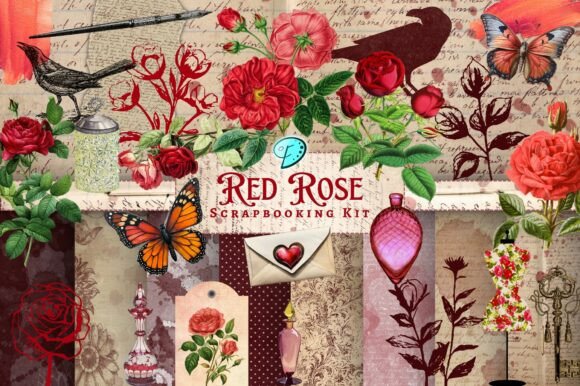
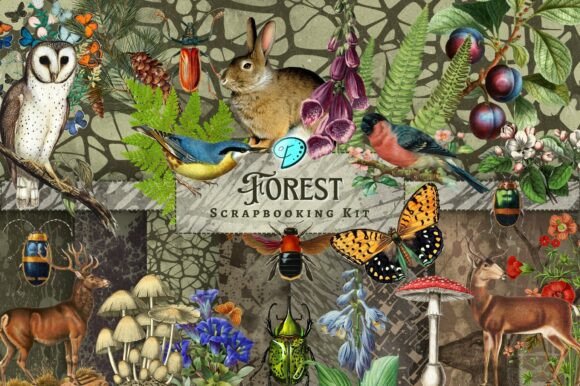
When you acquire a digital pack, the value lies in the versatility and quality of the assets. A typical high-quality forest-themed kit includes a curated selection of elements designed for various applications. For instance, receiving 25 clipart files at 1000 x 1000px with 300dpi ensures that your images remain crisp whether you are printing small tags or using them in digital layouts. These transparent PNGs are essential for layering, allowing you to place leaves, branches, or woodland creatures over backgrounds without unsightly white boxes surrounding them.
Additionally, the inclusion of 8 digital papers at 2000 x 2000px provides ample resolution for full-page backgrounds. At 300dpi, these JPEGs are print-ready, meaning they will not appear pixelated when used in physical projects like junk journals or greeting cards. It is crucial to recognize that these specifications are not arbitrary; they represent the industry standard for professional-quality output. Ignoring these details can result in blurry prints or elements that do not scale correctly, ruining the final presentation of your craft.
Common Mistakes in File Management and Compatibility
One of the most frequent errors beginners make involves mishandling compressed files, particularly when moving between operating systems. If you are a Windows user downloading a kit created on a Mac, you may encounter files with ._ prefixes. These are not duplicate images or corrupted data; they are metadata files used by macOS. Attempting to open or delete them indiscriminately can lead to confusion, making it seem like files are missing or duplicated.
The better approach: Always check the zip file contents against the product description before assuming something is wrong. If you see extra files starting with underscores, ignore them. Focus on the actual image files listed in the description. This simple step saves time and prevents unnecessary stress. Furthermore, ensure you have software capable of handling transparent PNGs and high-resolution JPEGs. Basic image viewers may not display transparency correctly, leading to the mistaken belief that the clipart is flawed.
Misunderstanding Usage Rights and Sources
Another critical area where creators stumble is the origin of the imagery. Many assume that all digital elements are originally drawn by the seller, but this is not always the case. In many forest-themed kits, clipart images are sourced from public domain materials. This does not diminish their value; rather, it highlights the curator’s skill in selecting, enhancing, and blending these elements with hand-drawn illustrations and mixed media textures.
However, misunderstanding this can lead to incorrect assumptions about licensing. While the kit itself is licensed for your personal or commercial use (depending on the seller’s terms), the underlying public domain images may have different historical contexts. It is vital to read the store information carefully. If you plan to use these elements for commercial products, such as selling printed journals or digital planners, verify that the seller’s license covers this usage. Failing to do so can expose you to legal risks or ethical dilemmas regarding attribution.
Optimizing Your Creative Workflow
To get the most out of your Forest Scrapbooking Kit, consider how the elements interact. The blend of hand-drawn illustrations, found imagery, and digitally enhanced visuals is designed to create depth. A common mistake is using elements in isolation, which can make layouts look flat. Instead, layer the transparent PNGs over the digital papers to create a cohesive scene. Use the ephemera pieces for envelopes and tags to add a tactile feel to digital designs or physical junk journals.
For those new to digital crafting, start with simple projects. Create a single card or a journal page before attempting complex albums. This allows you to familiarize yourself with the resolution and transparency features without feeling overwhelmed. Remember, the goal is to enhance your storytelling, not just to accumulate assets. By focusing on how each element contributes to the overall narrative, you elevate your work from basic assembly to artistic expression.
Pre-Purchase Checklist for Smart Buyers
Before committing to any digital download, take a moment to evaluate your needs and the product’s suitability. Here are key points to consider:
- Check Resolution Requirements: Ensure the 300dpi specification meets your printing needs. If you only work digitally, lower resolutions might suffice, but for print, 300dpi is non-negotiable for quality.
- Verify File Formats: Confirm that your software supports PNG transparency and JPEG handling. Most modern design tools do, but older or basic programs may struggle.
- Read Store Policies: Look for clear information on refunds, support, and licensing. A seller who invites questions and provides detailed store information demonstrates professionalism and reliability.
- Assess Aesthetic Fit: Ensure the forest theme aligns with your project’s mood. Natural, earthy tones work well for rustic or vintage styles but may clash with bright, modern designs.
If you have any questions about the products, do not hesitate to message the seller directly. A responsive creator who gets back to you ASAP is a good sign of customer care. This interaction can also clarify any ambiguities regarding file usage or technical support.
Final Thoughts on Quality and Satisfaction
Investing in a well-curated digital kit like this Forest Scrapbooking collection can significantly enhance your crafting experience. By avoiding common technical mistakes, understanding the source of your assets, and planning your workflow, you ensure that every project meets your standards. Remember, the value of digital scrapbooking lies not just in the files themselves, but in how effectively you use them to bring your creative vision to life. Take the time to learn the tools, respect the licensing, and enjoy the process of creating something beautiful and meaningful.